Shaun Jooste

Updated 2 years ago

Resize your videos

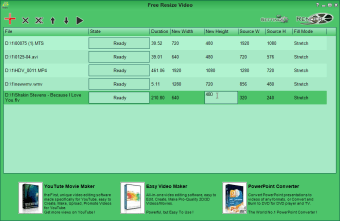
Free Resize Video, a free tool of Easy Video Maker, is a video editing tool that is made mainly for resizing videos and changing their resolution. The software is pretty easy to master, given that it has a straightforward interface. Users will simply have to fill in or change the values on the tables, which are readily customizable with just one click.

Fill in the tables

It is not that hard to know how to operate Free Resize Video. As mentioned above, the interface is straightforward and all of its functions are accessible. To start with, importing video files can be done clicking on the big red plus sign located at the top right corner of the window. As it is the only button that’s colored red, it won’t be easy to miss. Once you have selected and imported the videos you would like to convert, you can now edit and change the height and width of the video by typing in new values on the space. After putting in your new width and height, click on Settings to select an output format. Free Resize Video supports different video file formats and can, therefore, render whatever video you would like to resize. After everything is done, you simply have to select Render and the software will process your video. 

Simple edits

Free Resize Video is easy to learn and makes resizing videos a piece of cake. Unfortunately, its capabilities are limited to only that. It lacks a lot of editing features as well as advanced settings that could have also fixed the video’s quality instead of simply changing their dimensions. Still, if you are looking for a quick and easy solution, Free Resize Video will do.


Shaun Jooste

With extensive experience in gaming and creative writing, he has authored novels and contributed articles and reviews on the latest titles. His career spans both publishing and content creation, combining knowledge of storytelling with hands-on analysis of games and digital media.

  • Pros

    • Easy to navigate
    • Compatible with any video format
    • Input any desired value
  • Cons

    • Lacks a lot of editing features
    • No other uses
    • Dull interface
 0/1

App specs

  • License

    Free

  • Version

    1.08
  • Latest update

  • Platform

    Windows

  • OS

    Windows 7

  • Language

    English

  • Downloads

    37.5K

    Last month's downloads

    • 113
  • Size

    26.94 MB

  • Developer

Program available in other languages


User reviews about Free Resize Video

3

3 reviews

Add review

Main reviews for you

  • Anonymous user

    Didn't work for me. It always created a resized video of some kbs and when trying to open it never worked

  • Anonymous user

    OK with small videos. However, with larger videos, the conversion is very slow and the result is pretty poor. The video is jerky. It nearly looks like a quick series of photos rather than a video.

  • Anonymous user

    Waste of time. Doesn't work properly.It stops resizing after few seconds.After you upload your video it is hard to manage the app because its not well organized. When it starts resizing it gets blocked and that's it.

More

You may also like

Alternatives to Free Resize Video

Explore Apps

Latest articles

Laws concerning the use of this software vary from country to country. We do not encourage or condone the use of this program if it is in violation of these laws.
Softonic

Is Free Resize Video safe?

100/100

Score result: Clean

This file passed a comprehensive security scan using VirusTotal technology. It is safe to download.

  • Virus free
  • Spyware free
  • Malware free
  • Verified by Security Partners

    VirusTotal logo

Scan Info

Last scan
Tuesday, May 16, 2023
Scan provider
VirusTotal · Full report

File Integrity

File
freeresizevideo.exe
SHA256
4e9a39a395b6ae850d65f9a256e20dc87b679d95a26e9156175326d1c0211381
SHA1
c672d6b70cf8ea8f089cb7b79805e52f84031c5f

Softonic security commitment

Free Resize Video has been thoroughly scanned by our advanced security systems and verified by industry-leading partners. This file comes from the official developer and has passed all our security checks, showing no signs of viruses, malware, or spyware. For more information, visit our Security and Trust Center